
In-App Survey SDK Guide for Mobile and Game Teams 2026
Choose the right in-app survey SDK. This guide covers technical requirements, evaluation criteria, and best practices for iOS, Android, Unity, and more.
You already know the pattern. Analytics shows a drop during onboarding, a paywall gets dismissed, or a player exits after a difficulty spike. The dashboard tells you what happened. It usually doesn't tell you why.
Teams often try to fill that gap with email surveys, app store reviews, support tickets, and internal guesses. That stack is noisy and delayed. By the time a user answers an email, the moment is gone. By the time a support ticket arrives, you're hearing from a narrow subset of frustrated users. By the time a PM writes a hypothesis, the team may already be building the wrong fix.
That's why the in-app survey SDK has become a standard part of the mobile stack. It gives product, growth, and game teams a way to ask short, context-aware questions inside the experience itself, then connect those answers to flows, segmentation, experiments, and retention work.
Why Your Team Is Flying Blind Without In-App Surveys
A lot of mobile teams overestimate what analytics can explain on its own. Funnel data can show that users drop on step three of onboarding. Revenue data can show that a subscription offer underperforms for one cohort. Session replays can show hesitation. None of that tells you whether users were confused, unconvinced, price-sensitive, distracted, or missing a critical feature.
That gap matters because the fix depends on the reason. If users skip onboarding because the value prop is vague, you need a messaging change. If they skip because setup feels like work, you need a shorter path. If they decline a paywall because the packaging is wrong, a prettier paywall won't solve it.
Why external feedback arrives too late
Email surveys still have a place, especially for longer research. But they're a poor tool for fresh, in-product intent. In-app survey SDKs exist for the moments where timing changes response quality: right after onboarding, right after a feature threshold, right after a failed conversion, or right before cancellation.
Practical rule: Ask when the memory is fresh and the action is still interpretable.
That's also why these SDKs are no longer a niche add-on. In 42matters' App Store survey SDK analysis, Pollfish appeared in 32.20% of apps using survey SDKs, and that represented 2.37% of app downloads within the survey-SDK category. The important point isn't the vendor ranking. It's that survey SDKs have clearly become a real category in the mobile ecosystem.
What teams usually get wrong
The common mistake is treating surveys as a passive reporting tool. They launch a form, collect answers, and park them in a dashboard no one checks during release week.
A better model is operational:
- Tie feedback to moments: Onboarding completion, paywall decline, feature exhaustion, cancellation intent.
- Keep the question load tiny: Short prompts fit mobile behavior better than research-style questionnaires.
- Route answers somewhere useful: Product, CRM, experimentation, lifecycle campaigns, or live in-app logic.
- Respect user attention: A survey that feels random becomes wallpaper fast.
An in-app survey SDK is valuable when it closes the distance between user behavior and user explanation. Without that, teams are still guessing. They just have prettier charts.
Anatomy of an In-App Survey SDK
A team ships a paywall test, sees conversion dip in one segment, and wants to know why before the next release window closes. The survey SDK matters at that moment. If it can only throw up a form and dump answers into a dashboard, it will not help much. If it can tie a response to the experiment variant, the user state, and the next in-app experience, it becomes part of the product system.
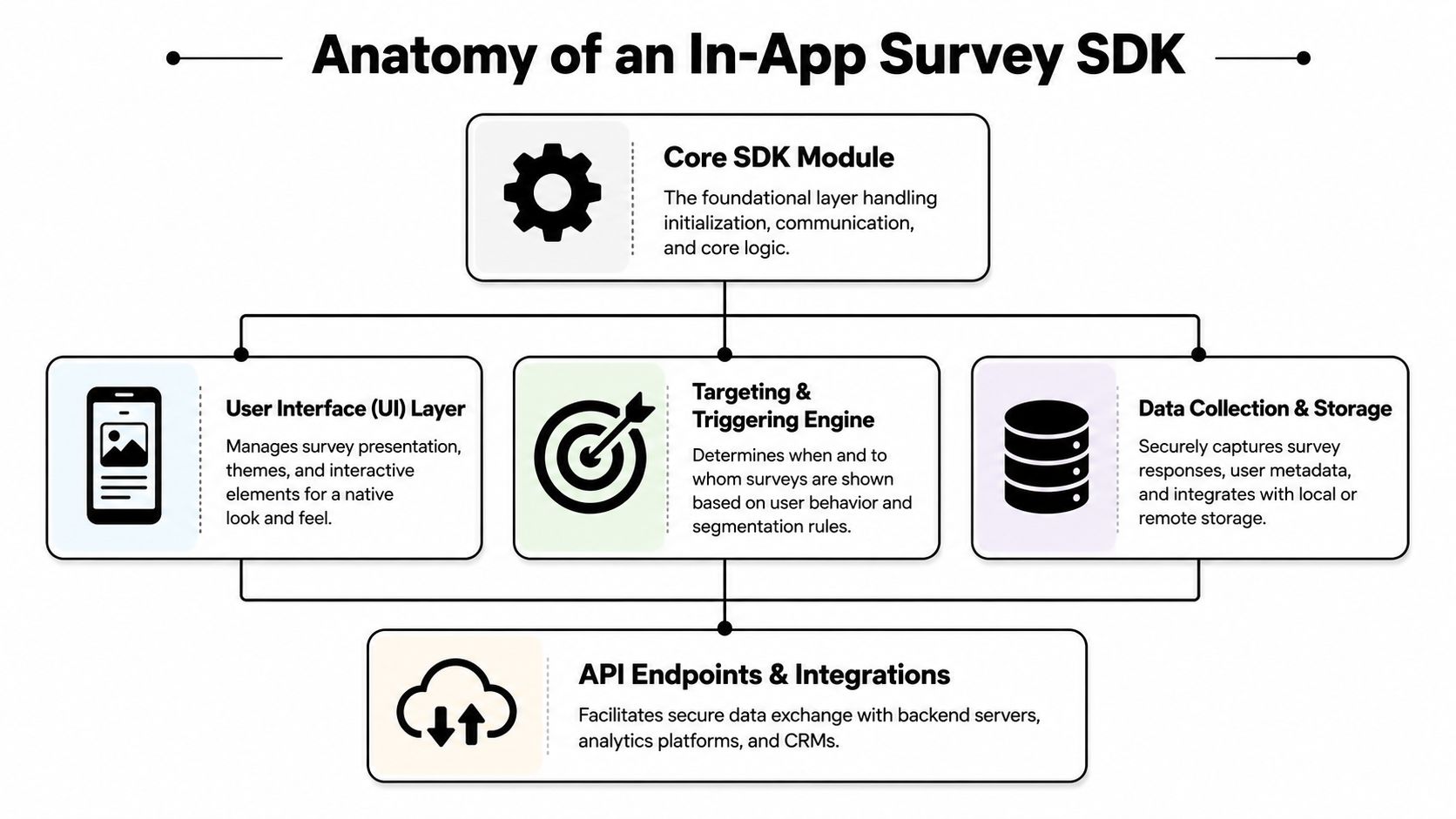
A real in-app survey SDK usually has four parts: a presentation layer, a logic engine, a trigger and eligibility layer, and a data pipeline. The form builder gets the demo time. The operational value comes from how those parts work together in production.
The presentation layer
The presentation layer is the visible part. On iOS and Android, that may be native UI, a web view, or a hybrid layer. In React Native, Flutter, Unity, and Unreal, the rendering path changes, but the key question stays the same: does the survey behave like your app, or like a third-party overlay?
The details here affect completion more than teams expect.
- Native-feeling rendering: Font scaling, dark mode, localization, accessibility, and safe-area handling need to work without custom patching.
- Input friction: Tap targets, keyboard behavior, focus management, and dismissal rules often decide whether a user finishes or abandons.
- Placement control: Full-screen, modal, card, banner, or embedded surfaces fit different moments and different levels of urgency.
A paywall objection survey should feel intentional and lightweight. A post-level game prompt cannot block controls or break flow. If the UI layer feels off, response quality drops before analysts ever read the first answer.
The logic engine
The logic engine determines whether the survey asks useful questions or wastes a session. Good SDKs support branching, skip logic, answer-dependent follow-up, quotas, cooldowns, and survey-level eligibility rules.
That matters because one question often needs context from the prior answer. If a user declines an upgrade and selects "too expensive," the next prompt should narrow the issue to billing cadence, perceived value, or a competing option. If the user selects "missing feature," the survey should capture the gap, not force them through irrelevant pricing questions.
The best logic reduces question count. It does not inflate it.
This is also where operational use starts to show up. A survey answer should be able to update a profile, assign a segment, and influence what the user sees next. Teams running server-driven app UI patterns get more value here because they can change follow-up experiences without waiting for the next app release.
The triggering and data layers
Triggering decides who sees the survey. The data layer decides whether the answer is usable later. Those two pieces are where many SDK evaluations fall apart, because vendors often demo templates and underplay runtime behavior.
An effective SDK should handle:
| Component | What to inspect |
|---|---|
| Triggering | Event-based rules, suppression windows, throttling, segment filters, and experiment-aware targeting |
| State | Whether the user has seen, answered, skipped, or deferred the survey across devices and sessions |
| Payloads | User ID, anonymous ID, experiment variant, event context, device metadata, locale, and answer values |
| Delivery | Retry behavior, batching, offline handling, failure logging, and consent-aware data collection |
The operational quality depends on the runtime, state management, and data path.
If a user answers "I couldn't find feature X" after failing an onboarding step, that response should not sit in an isolated survey tab. It should be joinable with funnel events, tied to the A/B test variant, passed into segmentation, and available for follow-up inside the app. That is the difference between collecting sentiment and making product decisions with it.
The Technical Evaluation Checklist
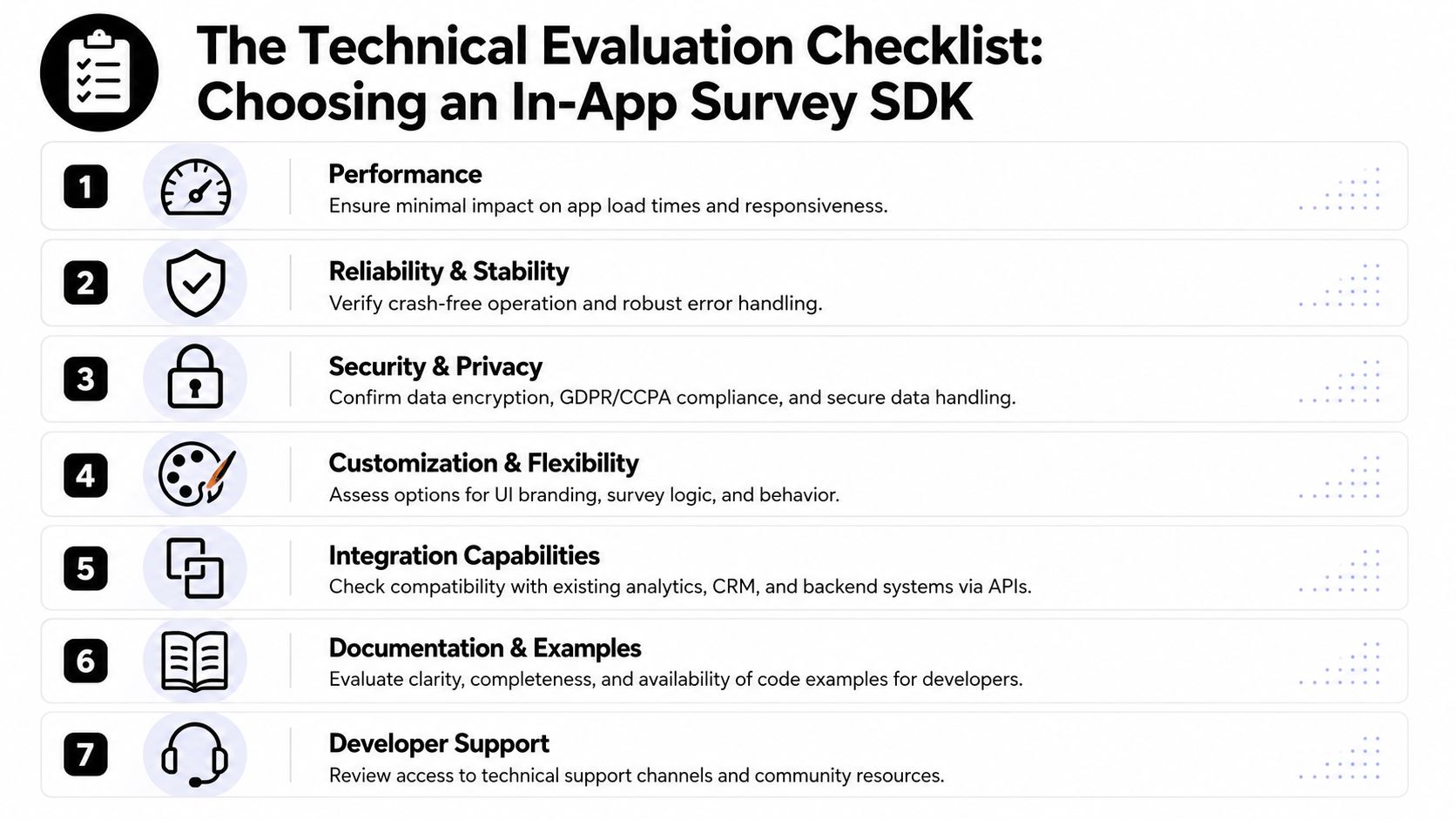
Engineering teams should evaluate an in-app survey SDK the same way they'd evaluate any production dependency. Nice templates don't matter if the SDK adds jank, breaks identity stitching, or behaves unpredictably across platforms.
Performance is the first filter
If an SDK touches the main thread at the wrong time, users feel it before your team sees it in a dashboard. Formbricks describes its in-app survey SDK as only 7KB and deferred-loading, which is the right design direction for mobile. The point is less about one vendor and more about the standard you should expect: tiny footprint, deferred loading, and no visible hit to startup or interaction responsiveness.
When reviewing performance, ask:
- How is the SDK loaded: Deferred, lazy, or at app start?
- What happens on initialization: Network calls, cache reads, or UI registration on launch?
- Does rendering block navigation: Especially during onboarding, checkout, or gameplay?
- Can it operate remotely without app releases: This matters even more in a server-driven app UI setup, where delivery logic changes faster than your binary.
Cross-platform support is rarely equal
Many vendors say they support mobile, but support can mean very different things. Native iOS and Android SDKs are one thing. React Native and Flutter wrappers are another. Unity and Unreal support can be shallow unless the vendor has built for game workflows.
Use a matrix like this during vendor review:
| Platform | What “real support” looks like |
|---|---|
| iOS | Swift compatibility, UIKit and SwiftUI sanity, background/foreground lifecycle handling |
| Android | Kotlin support, fragment/activity safety, Compose compatibility questions answered clearly |
| React Native | Stable bridge behavior, event sync, low-maintenance native setup |
| Flutter | Plugin maturity, async event handling, rendering consistency |
| Unity | No interruption of core loops, clean scene integration, platform callback support |
| Unreal | Reliable native bridge path and clear documentation for packaging |
If the docs only show web examples or generic “mobile support,” treat that as a warning.
Offline behavior is where many SDKs get exposed
A surprising amount of public vendor material talks about triggers and publishing but says very little about flaky connections, queued responses, or late reconciliation. SurveyMonkey's mobile SDK documentation explicitly says an Internet connection is required to show surveys. That's a useful reality check.
For apps in travel, field service, delivery, or global markets, ask these before signing:
- Can the SDK cache a scheduled survey locally?
- Can a user answer while offline, then sync later?
- How are retries deduplicated?
- What happens if identity changes before sync completes?
If your users go offline, “works in the demo” isn't a meaningful reliability standard.
Strategic Integration and Targeting Capabilities
The best in-app survey SDK is useless if it reaches the wrong person at the wrong moment. Good targeting isn't a nice extra. It's the difference between insight and annoyance.
Event-driven beats timer-driven
The cleanest survey programs start from product events, not clocks. Delighted's SDK guidance highlights event-driven prompts such as onboarding completion or checkout abandonment, and notes that this approach can yield response rates up to 40% higher than time-based delivery because it captures the user at the moment of truth.
That tracks with what works in production. A timer asks for feedback because elapsed time says it should. An event asks because the user did something meaningful.
Good trigger candidates include:
- Onboarding abandonment: Ask what blocked setup before the session context disappears.
- Feature threshold reached: Ask whether the feature delivered expected value after repeated use.
- Paywall decline: Capture objections while the value comparison is still active in the user's head.
- Cancellation attempt: Ask the reason before routing to save logic or roadmap tagging.
Identity discipline matters more than another dashboard
The hardest integration bugs are usually boring. Anonymous IDs don't merge cleanly after login. Survey responses arrive under one identifier while analytics events use another. Retry logic duplicates submissions. Entitlement state is stale when a subscription flow changes.
A usable implementation needs:
- A single identity plan: Anonymous, logged-in, and merged-user handling must be defined upfront.
- A clean event schema: Name events once, version properties carefully, and avoid ad hoc payload drift.
- Consent boundaries: Don't let open text become a backdoor for collecting data your privacy model doesn't allow.
- Entitlement awareness: If you segment by trial, subscriber, lapsed, or refunded, pass that state consistently.
For teams refining audience logic, behavioral segmentation in mobile growth systems is a better framing than broad demographic targeting. What a user just did is often more valuable than who you think they are.
Targeting should change the next action
A survey becomes strategically useful when answers can alter what happens next. If a user says “I don't understand the value,” that should put them in a message test for clearer benefits. If they say “too expensive,” that may justify trying different packaging or billing cadence. If they say “missing feature,” route the signal to roadmap review and suppress irrelevant upsell prompts.
That doesn't require manipulative UX. It requires coherent systems. The survey, the segmentation layer, the experiment framework, and the campaign logic have to agree on the same user and the same event.
You don't need more responses than your team can act on. You need answers tied to a decision.
From Feedback to Flow How Nuxie Activates Survey Data
Most survey tooling stops at collection. It gives you triggers, response charts, maybe some tagging, then leaves the hard part to the team. Someone has to export answers, join them with analytics, define audiences, coordinate experiments, and manually update in-app experiences. That gap is why so much user feedback dies in a dashboard.
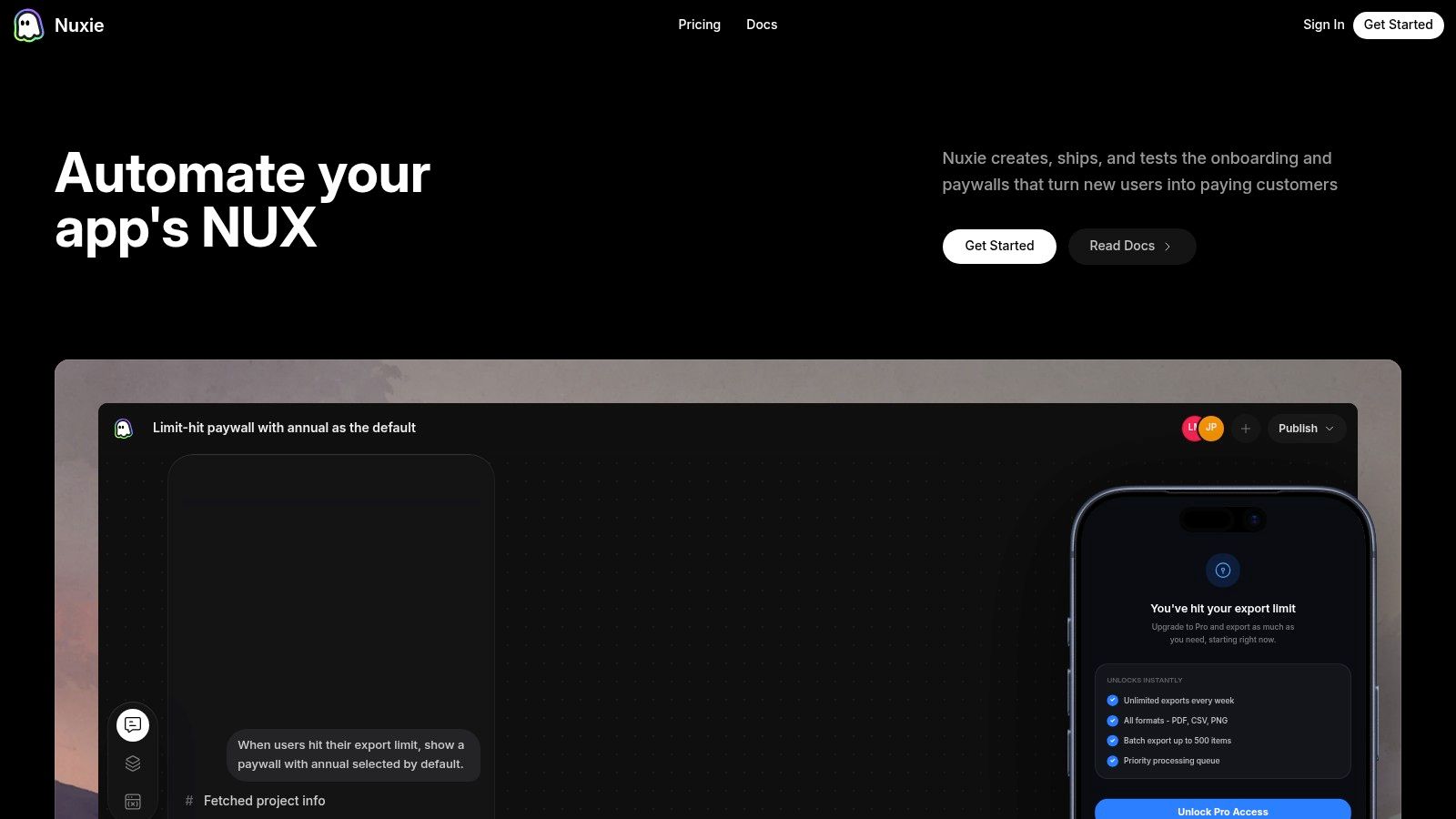
What changes the game is making survey data operational inside the same runtime that controls in-app flows.
Answers should branch experiences
A practical example is upgrade friction. If a user declines a paywall and selects “price,” the next screen can test a different package, billing cadence, or save offer. If the answer is “not enough value,” the next experience should reinforce benefits, proof, or feature relevance instead of discounting blindly.
The same logic applies outside monetization:
- Onboarding personalization: Route a user into a flow based on stated goal or role.
- Churn-save moments: Show different retention paths based on cancellation reason.
- Feature-fit checks: Trigger education, not a generic prompt, when users report confusion.
- Post-campaign follow-up: Use stated intent to shape the next message or surface.
That's where targeting and skip logic become more than survey features. They become flow controls.
Operational feedback needs shared context
Nuxie's model is particularly useful for mobile and game teams. It's an AI-native platform for in-app experiences, experimentation, analytics, billing, entitlement, and growth workflows across iOS, Android, React Native, Flutter, Unity, and Unreal. The key advantage isn't “more surveys.” It's that the answer can immediately change the live journey without waiting for an app release.
That matters when you want to connect qualitative feedback to quantitative outcomes such as conversion, retention, entitlement state, and offer performance. It also matters when your team already has tools in place. Nuxie is provider-agnostic, can work alongside existing analytics and monetization systems, and doesn't charge a revenue-share fee on billing and entitlement data.
What this looks like in practice
Instead of asking “why did this user churn?” and reading the response days later, teams can:
| Survey answer | Immediate operational response |
|---|---|
| Value unclear | Test clearer messaging or a different benefit sequence |
| Price objection | Try packaging, offer, or timing variants |
| Missing feature | Tag for roadmap analysis and suppress mismatched upsells |
| Setup confusion | Branch to guided onboarding or contextual education |
That's a significant shift. The survey is not the endpoint. It's an input into the next decision.
Practical Use Cases and Survey Best Practices
A user hits your paywall, closes it, and leaves a one-line complaint. If that answer ends up in a dashboard nobody checks until next week, the survey did not help the product. The useful version is operational. The response updates a segment, informs the next experiment, and changes what the user sees while the session still matters.
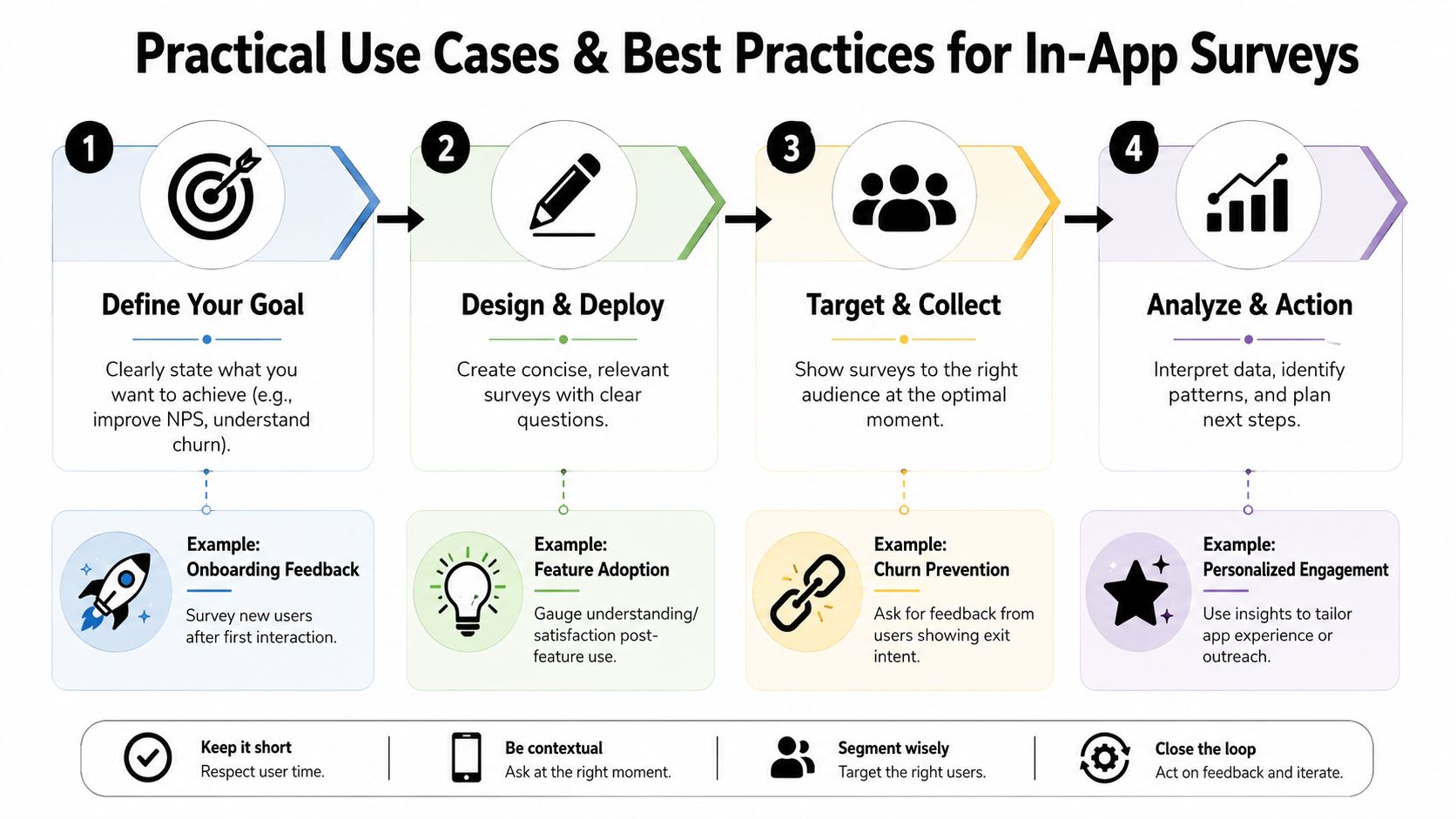
Four high-value use cases
Onboarding personalization
Ask one setup question tied to an actual branch in the onboarding flow. Good examples are goal, role, team size, or preferred play style. Then use that answer to change tutorials, default settings, starter content, or the order of feature education. If nothing changes in the experience after the answer, skip the question.
Paywall objection capture
A declined upgrade is one of the best moments to ask a short question because intent is clear and the trade-off is measurable. Keep it to one tap when possible. Then map common objections to experiments you can run, such as value messaging, package design, trial length, timing, or offer eligibility. Do not dump every free-text response into a generic "pricing feedback" bucket and call it insight.
Churn-save feedback
At cancellation or downgrade intent, ask the minimum needed to choose a next action. "Too expensive" and "didn't use it enough" should not trigger the same recovery flow. One may justify a lower-tier plan or pause option. The other may call for education, reminders, or a different activation sequence. Survey design and retention design intersect.
Feature-fit validation
High usage can hide frustration. A user may complete the flow often because they have to, not because it works well. After repeated use of a feature, ask whether it solved the problem and what was missing. Pair that answer with usage depth, repeat rate, and downstream conversion so the team can tell the difference between habit and satisfaction.
Best practices that hold up in production
Short surveys win because mobile attention is scarce. One question is usually enough. Two or three can work when the second question is conditional and the prompt appears at a moment with clear context.
A few rules hold up across subscription apps, games, and utility products:
- Tie every survey to a decision. Before launch, define what changes if users answer A, B, or C. If the team cannot name the action, the survey is research theater.
- Ask at a meaningful moment. Post-onboarding, post-purchase, feature completion, paywall exit, cancellation intent, and support deflection points usually outperform generic homepage prompts.
- Use skip logic with restraint. Conditional follow-ups improve signal, but every extra step costs completion. Earn the second question.
- Throttle aggressively. Recency rules, per-user caps, and campaign priority matter more than squeezing out a few extra responses.
- Test survey impact. A prompt can change conversion, retention, and session length. Hold out a control group when the survey appears near sensitive product moments.
- Store answer context with the response. Campaign ID, app version, experiment variant, entitlement state, locale, and user segment should travel with the event. Without that metadata, analysis turns into guesswork.
- Route free text somewhere usable. Product, growth, support, and lifecycle teams need different cuts of the same response set. Build tags, owners, and review rules before volume arrives.
Question quality matters too. Avoid broad prompts like "How are we doing?" They produce vague sentiment and weak next steps. Better questions are narrow and operational: "What stopped you from subscribing today?" or "What were you trying to do when setup felt confusing?"
For teams refining prompts before rollout, user testing practices for apps helps separate exploratory research questions from in-product questions tied to conversion, retention, or onboarding flow changes.
A good in-app survey respects the fact that the user opened the app to do something else.
What doesn't work
Long forms inside mobile UI usually fail. So do surveys shown on first launch before the user has enough context to answer, surveys triggered every time a user hits the same screen, and survey programs that stop at reporting.
The best implementations treat survey answers as product inputs. They feed segments, explain A/B test results, suppress irrelevant messages, and trigger the next in-app experience with intent. That is the standard worth holding.
Frequently Asked Questions for Mobile Teams
How do I keep survey data consistent across anonymous and logged-in states
Define identity rules before launch. Decide which ID owns pre-login events, how merge happens at sign-in, and whether survey responses are rewritten or aliased after authentication. If analytics, CRM, and survey events don't share that rule, your segmentation will drift and you'll mistrust the data later.
What's the safest way to handle offline responses
Queue locally, sync later, and deduplicate server-side. The practical challenge isn't just transport. It's making sure the response still belongs to the right user and campaign if the app state changes before reconnect. Teams should test identity changes, retries, app restarts, and expired campaigns before rollout.
Can I A/B test the impact of showing a survey at all
Yes, and you should when the prompt sits near sensitive conversion or retention moments. Amplitude's guides and surveys documentation shows that advanced platforms can A/B test the presence of a survey itself. That matters because surveying can influence downstream behavior. If you don't test for that, you may mistake prompt effects for product effects.
What's the difference between a basic survey SDK and a growth platform
A basic SDK collects answers. A growth platform can use those answers to shape segments, experiments, offers, onboarding, messaging, entitlements, and follow-up experiences. The distinction is actionability. If your team still has to export responses and wire everything manually, you bought collection, not orchestration.
What feature matters most in practice
Targeting plus skip logic. Targeting gets the survey into the right moment. Skip logic keeps it short and relevant. Together, they let you ask why a user abandoned onboarding, declined a paywall, hit a limit, or moved toward churn, then respond differently based on what they said.
What should my team look at every week
Not just response counts. Review answer themes by cohort, where prompts were triggered, which answers changed a live flow, and whether those changes affected conversion or retention. The most useful metric is often not “how many people answered,” but “what did we change because they answered?”
If your team wants to turn feedback into live in-app actions instead of another reporting silo, Nuxie is built for that workflow. It helps mobile apps and games ship surveys, onboarding, paywalls, experiments, offers, analytics, billing, and entitlement-aware flows across iOS, Android, React Native, Flutter, Unity, and Unreal, with provider-agnostic integrations and no revenue-share fee on billing data.