

Server-Driven App UI: A Guide to Faster Mobile Updates
Learn how server-driven app UI lets you ship updates, run experiments, and personalize experiences on iOS & Android in minutes, not weeks. Your guide to SDUI.
Your team already knows the feeling. A typo ships in onboarding. A paywall headline underperforms. Product wants to reorder a question, growth wants a new branch, and support wants the broken offer removed before the weekend. The change itself is trivial. The release path isn't.
For many mobile teams, the main bottleneck isn't building UI. It's waiting for app review, rollout, and user adoption for changes that should've been live the same day. That gap creates missed experiments, stale copy, and a constant habit of batching small improvements into bigger releases than they should be.
Server-driven app UI is the architectural answer to that problem. Instead of hard-coding every screen decision inside the binary, the app renders from a server-defined UI model. That changes who can move fast. Engineering still owns the runtime, safety rails, and native components. Product and growth can iterate on flows, content, sequencing, and experiments without tying every adjustment to a store release.
That shift matters most on surfaces that change often: onboarding, promotions, in-app announcements, monetization moments, surveys, and liveops. It also changes how teams collaborate. Frontend, backend, analytics, experimentation, and billing stop acting like separate layers and start acting like one operating system for in-app experiences.
If you're evaluating the category, it's useful to think in terms of a broader in-app experience platform, not just a rendering trick. The hard part isn't merely sending JSON. It's building a reliable system that can ship fast without making the app fragile.
Introduction Why Wait for an App Release to Change a Button
A hard-coded mobile app is great until the business needs motion.
One team needs to fix onboarding copy after launch. Another wants to test whether showing a paywall after a quiz performs better than showing it on app open. A game team wants to swap a liveops panel for a weekend event. None of those requests should require a full release cycle. Yet in many apps, they still do.
The pain isn't only delay. It's coordination cost. Engineering has to slot a “small” UI tweak into sprint work. QA has to validate a new build. Product has to wait for store approval and rollout. By the time the update reaches enough users to matter, the original question may already be stale.
The cost of release-bound UI
Release-bound UI changes create a few predictable problems:
- Experiments arrive late: A/B ideas for onboarding, conversion prompts, and retention flows often miss the moment when they were most relevant.
- Operational fixes get bundled: Copy corrections, layout adjustments, and broken offer removals wait behind larger releases.
- Cross-platform parity drifts: iOS, Android, React Native, and Flutter implementations rarely change at exactly the same pace.
- Growth depends on engineering for every move: Even safe, repetitive updates still need developer time.
Practical rule: If a change doesn't alter core app logic, it probably shouldn't depend on an app-store release.
That doesn't mean every screen should become dynamic. It means teams should stop hard-coding the parts of the product that are supposed to evolve weekly.
Where teams usually start
Teams typically don't begin with their most complex flow. They start where iteration matters most and risk is manageable:
| Starting surface | Why it fits server-driven app UI |
|---|---|
| Onboarding | Copy, sequence, and branching change often |
| Paywalls | Offers, presentation timing, and messaging need testing |
| Promotions | Campaigns and seasonal UI expire quickly |
| Surveys and announcements | Lightweight, targeted, and easy to validate |
| Liveops screens in games | Time-bound content benefits from remote control |
That's the practical lens for the rest of this discussion. Not “Can server-driven UI render everything?” but “Which parts of the app gain the most from decoupling UI updates from releases?”
What Is Server-Driven App UI
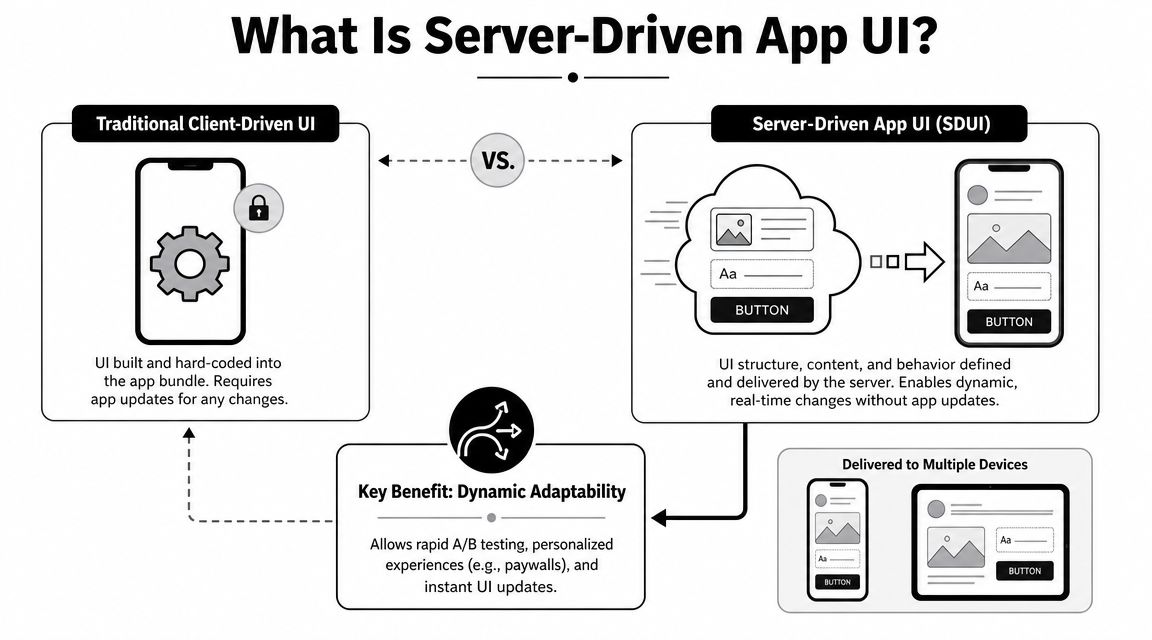
A traditional mobile app ships with its UI decisions bundled inside the client. The server sends data. The app decides how to render it. If the team wants a different layout, a new component order, or new behavior, the binary usually has to change.
Server-driven app UI flips that contract. The server returns presentation-ready UI information, often as JSON, and the client acts as a rendering engine rather than the source of UI truth. Apollo describes the pattern as a way to reduce client-side logic and keep apps synchronized across platforms while allowing teams to control UI elements or text without app version updates in its SDUI basics guide.
A better mental model
Think of client-driven UI as a boxed meal kit. The app ships with every screen variant packed into the binary, even if most users will only ever see a few of them.
Server-driven UI works more like a kitchen ticket. The client already knows how to render approved components such as text blocks, buttons, hero cards, progress indicators, quiz steps, or paywalls. The server decides which components to send, in what order, and with what content or behavior based on context.
The important distinction is this:
- Client-driven: the app owns layout decisions
- Server-driven: the server owns more of the layout and flow definition
- Hybrid: the app owns some screens, the server owns selected surfaces
That hybrid model is what most mature teams use.
What the client still owns
Server-driven doesn't mean the client becomes a generic browser. A good implementation still relies on native rendering and native components.
The client typically owns:
- A component registry: mapping schema types like
button,carousel, orpricing_cardto native views on iOS and Android - Navigation and lifecycle hooks: deciding how server-defined screens fit into the app shell
- Guardrails and validation: rejecting malformed payloads, applying fallbacks, and protecting performance
- Platform-specific affordances: accessibility semantics, animation constraints, and purchase APIs
The app doesn't stop being native. It stops being the place where every UI decision is hard-coded.
Why the pattern emerged
This architecture didn't appear because teams wanted a more abstract frontend. It emerged because fully client-driven mobile apps hit a practical limit. Every UI variant had to be bundled, reviewed, and distributed through app stores. That made the release process part of the product experience itself.
Server-driven app UI gave teams a way to move fast on surfaces that change often, while still keeping native rendering and platform-specific polish. That's why it shows up so often in product experiences where copy, targeting, timing, and sequencing matter as much as the underlying code.
Key Benefits and Realistic Drawbacks
Server-driven app UI earns attention for one obvious reason: speed. But its true advantage isn't only speed. It's where that speed shows up and which teams get to use it.
Digia reports that bundle-size reductions of 20–50% are typical when UI logic moves to the server, and contrasts update speed as instant for SDUI versus 1–7 days for client-driven releases when store review and adoption lag are included in its server-driven UI performance analysis. Those numbers explain why teams often start with high-change surfaces instead of trying to convert the whole app at once.
What tends to work well
The best use cases share three traits. They change often, they benefit from segmentation, and they don't require deep offline or gesture-heavy behavior.
Good fits usually include:
- Onboarding and activation flows: easy to reorder, personalize, and experiment on
- Monetization surfaces: paywalls, upsells, win-back offers, and trial messaging
- Promotions and live campaigns: launch banners, event cards, feature announcements
- Content-led screens: feeds, editorial modules, recommendation units
- Experiment-heavy product surfaces: places where mobile app A/B testing matters more than static layout purity
A useful pattern is to keep the app shell and critical journeys native, then make selected surfaces configurable.
The upside beyond shipping faster
The best teams use SDUI to change operating rhythm, not just release timing.
| Benefit | Practical outcome |
|---|---|
| Faster updates | Copy, layout, and sequencing can change without waiting on a store release |
| Better cross-platform alignment | iOS and Android can render the same experience from one server-side definition |
| Smaller binaries | Apps don't have to ship every possible UI variation in advance |
| Incremental adoption | Teams can start with one surface instead of a full rewrite |
Very Good Ventures shares one concrete example where 43% of the app is now server-driven, which is a good reminder that adoption often expands gradually once the architecture proves stable.
Where teams get burned
The trade-off is straightforward. You remove complexity from the client and introduce more of it into the backend and governance model.
Common problems include:
- Overly chatty payloads: too much nesting, too much duplication, or too many dependent fetches
- Weak contracts: payload changes land before older clients can safely render them
- Schema creep: the UI model turns into a second programming language
- Poor ownership boundaries: product edits a flow, but no one owns event naming, analytics semantics, or rollback behavior
Architect's warning: If the schema can express everything, it usually governs nothing.
What not to force into SDUI
Some teams hear “instant updates” and try to apply the pattern to every screen. That usually ends badly.
Keep these areas mostly native:
- Offline-critical flows
- Gesture-heavy interactions
- Highly interactive creative tools
- Performance-sensitive gameplay
- Complex device-native features
SDUI is strongest when it stays in its lane. Flexible, high-change, business-critical surfaces benefit most. Core app mechanics often don't.
Architectural Patterns and Data Design
A reliable server-driven system isn't “JSON over the wire.” It's a contract between product intent and native runtime behavior.
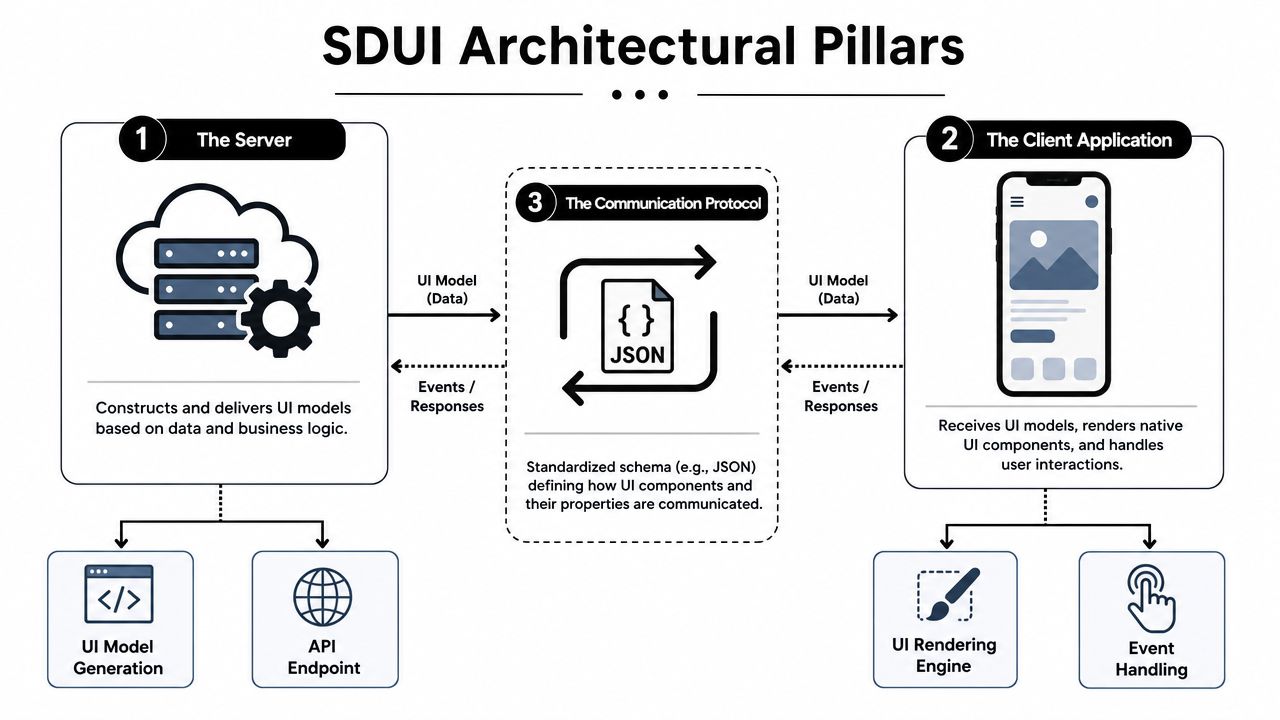
WeWeb describes the core pattern clearly in its server-driven UI architecture guide: the server returns a UI description, often as a JSON payload, telling the client which components to render, in what order, and with what data. The client then uses a component registry to map that schema to native widgets instead of hardcoded layouts. That keeps behavior aligned across platforms, but it also shifts assembly complexity to the backend.
The three parts that matter
A workable implementation usually has three architectural pillars:
Server composition layer
Here, data, targeting rules, business logic, and presentation templates come together. It decides what UI model a user should receive.Schema and protocol
This defines component types, properties, actions, nesting rules, and version compatibility. If this layer is weak, the entire system gets brittle fast.Client renderer
The app parses the payload, looks up each node in a component registry, and renders approved native views.
Each part can fail independently. That's why teams need more than a serializer and a few dynamic views.
What a good schema looks like
A strong schema is boring in the best way. It's typed, constrained, and predictable.
Good schema design usually means:
- Components are finite: not every design request creates a new component type
- Properties are explicit: title, subtitle, image source, action, state, spacing
- Actions stay simple: go to, dismiss, purchase, submit, track, open modal
- Unknown nodes degrade safely: skip, fallback, or render a placeholder instead of crashing
A weak schema tends to drift toward unchecked custom fields and nested logic blocks. That's where maintainability collapses.
Separate structure from data when possible
One mistake shows up early. Teams mix content, layout, targeting, analytics, and business state into one giant object. It works at first. Then every edit becomes risky.
A cleaner approach is to keep the payload legible:
| Layer | Responsibility |
|---|---|
| UI structure | Component tree and layout order |
| Content | Copy, images, labels, pricing text |
| Actions | Navigation, purchase, dismiss, open URL |
| Analytics metadata | Exposure names, tap events, experiment identifiers |
| Eligibility state | Entitlement, offer availability, segmentation inputs |
That separation makes testing easier and rollback safer.
Treat the schema like a public API. Because for older app versions, that's exactly what it is.
Design for failure first
The renderer should expect bad inputs. Missing assets. Unknown component versions. Empty data arrays. Invalid experiment rules. Null purchase metadata.
If your first implementation assumes perfect payloads, production will fix that assumption quickly. Defensive rendering is part of the architecture, not a cleanup task for later.
Implementing SDUI Across Mobile Platforms
The cross-platform challenge isn't rendering a button. It's rendering the same behavior on iOS, Android, React Native, Flutter, Unity, and Unreal without creating six subtly different products.
On iOS, a schema node might map to SwiftUI or UIKit. On Android, it might map to Jetpack Compose or legacy Views. In React Native and Flutter, the app still needs a local component vocabulary and a renderer that respects native navigation, gesture systems, lifecycle rules, and purchase flows. In Unity and Unreal, the problem shifts again. Frame timing, input handling, scene overlays, and economy state become part of the implementation.
Native mapping is the cleanest baseline
The safest approach is still a native component registry per platform.
A server payload might define:
- a stacked layout
- a headline
- a progress stepper
- a quiz question
- a CTA button
- a paywall panel
- a dismiss action
Then each client maps those nodes to local components it already knows how to render. That's how you preserve native accessibility, system text handling, purchase integration, and app-level performance controls.
For teams working through lifecycle concerns, especially around app state, deep links, and purchase return paths, application lifecycle handling on iOS is part of the implementation conversation whether the renderer is dynamic or not.
Why webviews are tempting and often disappointing
A webview can look like a shortcut. It gives fast content iteration and familiar authoring. It also introduces a different stack inside your app.
That trade-off is manageable for content-heavy pages. It's much less appealing for onboarding, monetization, and game liveops surfaces where interactions, rendering consistency, and native feel matter.
Comparison of Client-Side Rendering Strategies
| Strategy | Performance | Consistency | Richness of Interaction | Implementation Cost |
|---|---|---|---|---|
| Pure native mapping | High when component set is disciplined | High if schema is enforced well | High within approved component catalog | Higher upfront |
| Webview-based rendering | Variable, depends on page complexity | Lower across native app surfaces | Moderate, but often feels detached from app UX | Lower upfront |
| Shared runtime with custom renderer | Strong if runtime is optimized | Strong across supported clients | High, especially for designed flows and animation-heavy surfaces | Moderate to high |
The right choice depends on what you're building. If the goal is a simple marketing page, a webview may be fine. If the goal is a polished onboarding path, personalized paywall, or event-driven game flow, a native or custom-rendered runtime usually holds up better.
Rich interactions need a stricter runtime
A lot of server-driven systems fail when they move beyond static cards and buttons. That's where teams discover that “remote config plus layout JSON” isn't enough.
For flows with branching, animation, conditional purchase states, entitlement-aware actions, and analytics hooks, a shared runtime becomes more useful than a loose rendering layer. That runtime needs to keep behavior aligned across Swift, Kotlin, React Native, Flutter, and game-engine contexts.
This is also where rich motion matters. A custom renderer can preserve expressive interactions without dropping back to a generic web container.
The following demo gives a feel for what a modern runtime-enabled flow looks like in practice.
Platform-specific friction points
The implementation details differ by stack:
- iOS: safe areas, text rendering differences, StoreKit integration, view lifecycle timing
- Android: Compose versus View interoperability, back stack behavior, device fragmentation
- React Native: bridge boundaries, navigation sync, native module dependencies
- Flutter: custom painting and widget lifecycle alignment with remote state
- Unity and Unreal: overlay presentation, input focus, frame pacing, and purchase handoff
A good SDUI strategy doesn't pretend those differences don't exist. It defines a shared contract, then respects each platform's constraints instead of flattening them into the lowest common denominator.
Advanced Topics Governance and Scaling
The first server-driven screen is usually the easiest part. The hard part begins when product wants more templates, growth wants more targeting, analytics wants cleaner event taxonomies, and older app versions still need to render safely.
Practitioner discussions in the Mobile Native Foundation community highlight a point that still doesn't get enough attention: the difficult part isn't rendering server-defined screens. It's maintaining reliable contracts as component catalogs, rollout rules, and experiment surfaces expand across iOS, Android, React Native, Flutter, and related stacks in this discussion of SDUI governance and safety.
Treat it like a product system
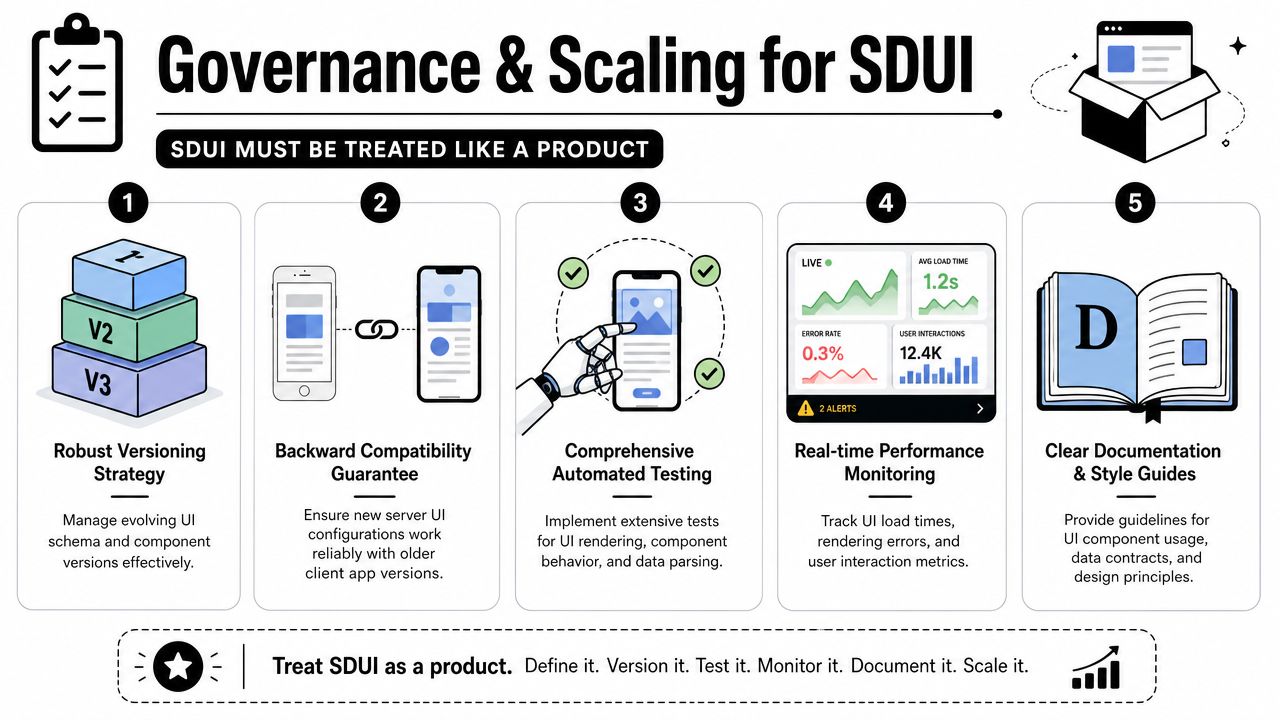
If the team treats SDUI as “just an API response,” entropy wins. Mature implementations need owners, review rules, release discipline, and observability.
That usually means:
- Versioned contracts: clients declare what they support, servers respond accordingly
- Approved component catalogs: design and engineering agree on what can be remotely composed
- Rollback paths: every remotely published flow can be disabled or reverted quickly
- Documentation standards: every component and action has typed properties and defined behavior
Without those basics, every new experiment increases risk.
Remote UI without governance becomes distributed guesswork.
Defensive rendering is non-negotiable
Older clients will receive newer ideas. Bad payloads will escape. Assets will fail to load. Experiment rules will target an edge case no one tested.
The client should be designed to survive that.
A practical defensive stack includes:
- Schema validation before render
- Fallbacks for unknown components
- Safe defaults for missing properties
- Cached last-known-good content
- Hard kill switches for bad flows
This is especially important when product teams can publish changes without waiting for engineering.
Scale changes the data model
Once server-driven UI supports onboarding, monetization, announcements, and liveops, the payload isn't only about layout anymore. It starts carrying targeting, exposure logging, experiment assignment, entitlement checks, and offer state.
At that point, you need a stricter governance model around:
| Governance area | Why it matters |
|---|---|
| Event schema | Keeps analytics readable across many dynamic flows |
| Entitlement state | Prevents showing the wrong offer or upsell |
| Experiment rules | Avoids overlapping or contradictory audience logic |
| Component compatibility | Protects older app versions from unsupported payloads |
| Publishing permissions | Stops accidental production changes |
Publish with release discipline
The safest teams launch server-driven flows the same way they launch code. They stage, preview, test, and monitor.
Before a flow goes live, it should already include:
- Targeting rules
- Exposure logging
- Experiment assignment
- Fallback behavior
- Rollback controls
That discipline is what makes server-driven UI scalable instead of chaotic.
Conclusion A Strategic Shift for Mobile Teams
Server-driven app UI isn't just a frontend pattern. It's a decision about how your company wants to operate.
Teams that adopt it well stop treating mobile UI changes as engineering tickets by default. They define native components once, build a safe rendering contract, and then let product, growth, and liveops move faster on the surfaces that need constant iteration. That's the strategic shift. Not “remote JSON.” Better coordination between app code, experimentation, analytics, and monetization.
The caution is real. Building an SDUI system from scratch means owning schema evolution, component compatibility, defensive rendering, publishing controls, analytics wiring, and rollback tooling. That's a serious platform investment. Some teams should make it. Many teams shouldn't.
The better question isn't whether server-driven UI is powerful. It is. The question is whether you want to build and maintain the whole operating system around it yourself.
For mobile apps and games, the opportunity goes well beyond paywalls. Onboarding, surveys, announcements, retention offers, entitlements, billing-aware flows, and liveops all benefit when the UI can change without waiting for store releases. The teams that win with SDUI usually keep the scope disciplined, the contracts strict, and the runtime predictable.
If your release process still controls changes that should be under product control, you're not looking at a design problem. You're looking at an architectural one.
Frequently Asked Questions About SDUI
Is server-driven app UI the same as using a webview
No. A webview renders web content inside the app. Server-driven app UI usually renders native components from a server-defined schema. That preserves better alignment with native navigation, accessibility, purchase APIs, and platform-specific interaction models.
How much of an app should be server-driven
Not all of it. Very Good Ventures notes that SDUI works best for content-heavy, frequently changing screens and is not ideal for offline-critical flows, gesture-heavy experiences, or highly interactive screens such as gaming and drawing apps in its discussion of SDUI limits and range. The practical decision is which parts of onboarding, monetization, and liveops should stay native for performance and maintainability.
What about offline support
Use caching and fallbacks. A common pattern is to cache the last-known-good payload for a server-driven surface, ship a bundled native fallback for first launch or failure cases, and keep critical offline journeys outside the dynamic layer.
Does SDUI hurt app performance
It can if the payload is bloated or the renderer is sloppy. It usually performs well when teams keep the component set disciplined, fetch only what's needed, validate payloads early, and avoid turning the schema into a full programming language.
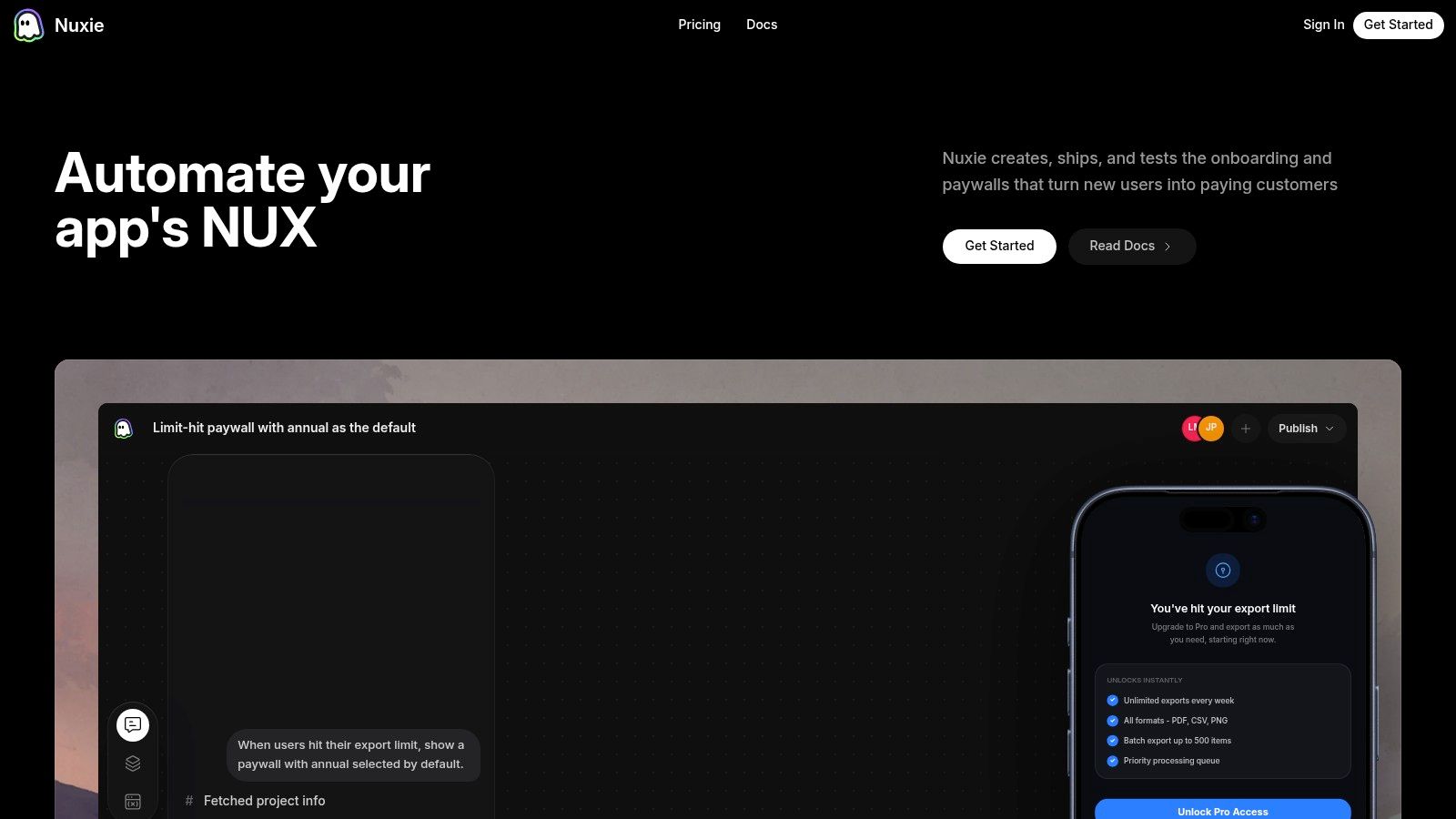
Nuxie helps mobile app and game teams ship server-driven experiences without building the full stack from scratch. It combines a collaborative flow editor, AI-native growth tooling, provider-agnostic analytics, experimentation, billing, purchase data, and entitlement infrastructure across iOS, Android, React Native, Flutter, Unity, and Unreal. Teams can use it for onboarding, surveys, announcements, liveops, and paywalls, while keeping existing tools where they make sense and avoiding revenue-share fees on billing and entitlement data. Explore Nuxie if you want the speed of server-driven app UI with the operational guardrails needed to run it safely.